
For EU users whose platform is closing
Your EU platform closing?Is your crypto platform leaving the EU?
Around the 1 July 2026 MiCA deadline, many platforms that didn’t secure a licence are winding down EU services. If yours is one of them, here’s a calm way to keep going.
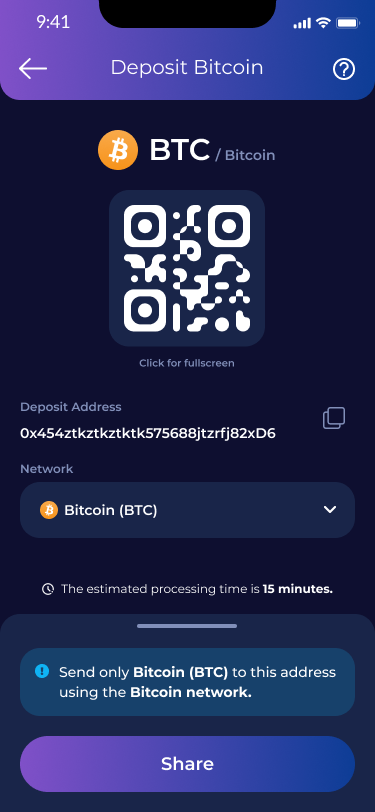


Free crypto transfer option
CryptoUnity does not charge a deposit fee. Standard blockchain network fees may still apply.
0% trading fees for 30 days
When you switch, with code SWITCH.
What the MiCA deadline means
MiCA is the EU’s crypto rulebook. From 1 July 2026, platforms need a MiCA licence to serve EU users. Many smaller, nationally-registered firms didn’t complete it and are pausing or exiting, but your funds with a regulated provider are not at risk.
- The MiCA transitional period ends 1 July 2026, with no extension.
- Industry estimates suggest a large share of firms won’t hold a licence in time.
- For most people the simplest move is to withdraw to euros, then start fresh in a licensed-custody app.
- Crypto itself stays fully legal — this is one company’s decision, not a market-wide problem.
Why CryptoUnity
Assets are held with regulated custodian BitGo.
Your crypto is held by BitGo, not by CryptoUnity.
Built for first-timers
Plain-language workshops and a calm, no-hype tone. No charts-and-candles pressure.
A dedicated EU team
Real people and human support, not a faceless global platform.
Two ways to bring your crypto over
Move your coins straight across, or take euros out and start fresh. Both are simple, so pick what suits you.
Move your crypto directly
No deposit fee · keep your coinsBring your coins straight over, no need to sell first. We don’t charge a deposit fee (only the blockchain’s own network fee applies).
- 1
Get your deposit address
In CryptoUnity, open the coin you want to receive and copy your address. Note which network it’s on.
- 2
Send from your exchange
Choose Withdraw / Send crypto, paste your CryptoUnity address, then select the matching network.
- 3
Send a small test first
Always send a tiny test amount first. Once it arrives, send the rest. A wrong network or address can mean lost funds.
- 4
Done, nothing to pay us
It lands in your CryptoUnity wallet. We don’t charge to receive it; only the network’s fee applies.
Moving crypto isn’t a sale, so you generally don’t realise a taxable gain the way selling to euros can. Still, check your local tax rules.
Or: sell to EUR and buy again
SimplestPrefer to start clean? Take euros out, then fund CryptoUnity by bank transfer (SEPA).
- 1
Withdraw to euros
On your exchange, sell to euros and withdraw to your bank.
- 2
Download CryptoUnity
Get the app, then verify once. About 5–10 minutes.
- 3
Fund by SEPA
Add euros from your bank, usually same-day in the EU.
- 4
Start, guided
Make a small first buy. You’ll start with 0% trading fees for 30 days.
Always send a small test transfer first and double-check the network. A wrong network or address can mean lost funds.
Common questions
How do I know if my platform is affected? +
Can I move my crypto over directly? +
Is CryptoUnity regulated? +
Take it one calm step at a time.
Download the app, verify once, and start small when you’re ready. Bring your crypto over with 0% trading fees for 30 days.
Get the app — 0% trading fees for 30 daysCrypto is volatile; its value can go down as well as up. Only invest what you can afford to lose.